


Pricing pages can make email software look simple: choose a plan, enter a contact count, and start sending. ActiveCampaign is a little more complicated because your bill depends on contacts, plan level, email volume, users, and optional add-ons.
That matters more in 2026 because ActiveCampaign has changed several parts of its pricing structure since the older pricing guides many marketers still find in search results. Its current U.S. pricing starts at $15/month for 1,000 contacts when billed annually, while the four email plans are Starter, Plus, Pro, and Enterprise. The platform also now highlights Active Intelligence, standard ecommerce integrations across the base plans, and separate add-ons for enhanced CRM, SMS, transactional email, custom reporting, and other capabilities.
This ActiveCampaign pricing guide breaks down the current structure, including contact limits, sending allowances, the difference between annual and monthly billing, CRM and SMS costs, and the changes that can make your actual bill higher than the headline price.
ActiveCampaign Pricing: Contact Limits and Costs
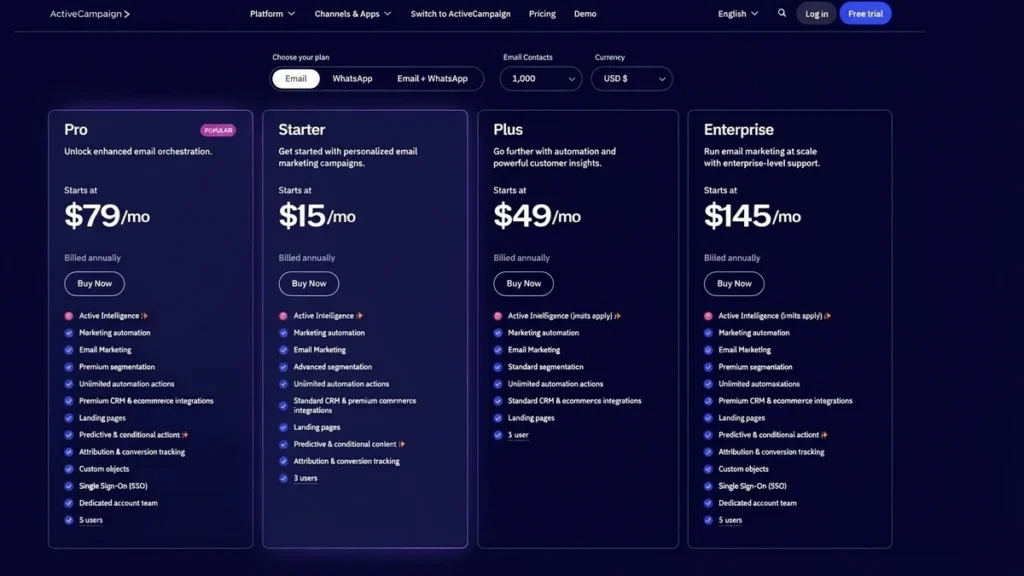
ActiveCampaign uses a contact-based pricing model. In practical terms, the number of contacts in your account is one of the biggest factors determining what you pay.
For new accounts created on or after November 3, 2025, all contacts count toward the contact limit, including contacts marked unsubscribed, bounced, or unconfirmed. Accounts created on or before November 2, 2025 follow the older active-contact-only rule. That distinction is important for long-time customers comparing their bill with what a new account would pay.
ActiveCampaign current pricing page displays the four email plans and uses annual-billed monthly equivalents. Current 2026 pricing data based on the pricing calculator shows the following U.S. prices for common contact levels. Because ActiveCampaign presents prices dynamically rather than as one permanent static table, it is sensible to verify the exact figure in the account checkout before purchasing.
| Contacts | Starter | Plus | Pro | Enterprise |
|---|---|---|---|---|
| 1,000 | $15/mo | $49/mo | $79/mo | $145/mo |
| 2,500 | $39/mo | $95/mo | $149/mo | $255/mo |
| 5,000 | $79/mo | $145/mo | $205/mo | $375/mo |
| 7,500 | $109/mo | $169/mo | $289/mo | $479/mo |
| 10,000 | $149/mo | $189/mo | $375/mo | $589/mo |
| 15,000 | $231/mo | $265/mo | $465/mo | $689/mo |
| 20,000 | $311/mo | $329/mo | $549/mo | $785/mo |
| 25,000 | $391/mo | $389/mo | $629/mo | $879/mo |
| 50,000 | N/A | $609/mo | $969/mo | $1,169/mo |
| 100,000 | N/A | $1,199/mo | $1,599/mo | $1,735/mo |
Prices shown are monthly equivalents on annual billing from 2026 pricing research; exact checkout pricing can vary by account, billing arrangement, promotion, or contact selection. Starter is capped at 25,000 contacts.
The first thing to notice is how sharply the price changes as your list grows. Starter moves from $15 at 1,000 contacts to $149 at 10,000 contacts. At 25,000 contacts, Starter reaches $391 and the Plus tier is actually listed slightly below it at $389 in the current pricing calculator data.
There is also a separate email sending limit. ActiveCampaign currently allows Starter and Plus to send up to 10 times the contact limit, Pro up to 12 times, and Enterprise up to 15 times per month. These limits apply to direct and automated marketing campaigns, not 1:1 or transactional emails.
That gives you a simple way to estimate the base sending allowance:
| Plan | Contact limit example | Monthly marketing sends |
|---|---|---|
| Starter | 1,000 | 10,000 |
| Plus | 1,000 | 10,000 |
| Pro | 1,000 | 12,000 |
| Enterprise | 1,000 | 15,000 |
| Starter | 10,000 | 100,000 |
| Plus | 10,000 | 100,000 |
| Pro | 10,000 | 120,000 |
| Enterprise | 10,000 | 150,000 |
This distinction is easy to miss. A 10,000-contact plan does not mean unlimited newsletters. You need to compare your expected monthly sends with the allowance attached to the plan.
What Included in Each Plan?
The current ActiveCampaign plans are built around progressively higher limits for automation, segmentation, AI, reporting, integrations, and team access. The differences are more meaningful than simply looking at the monthly price.
| Feature | Starter | Plus | Pro | Enterprise |
|---|---|---|---|---|
| Monthly email sends | 10× contacts | 10× contacts | 12× contacts | 15× contacts |
| Users included | 1 | 1 | 3 | 5 |
| Marketing automation | Yes | Yes | Yes | Yes |
| Automation actions | 5 per automation | Unlimited | Unlimited | Unlimited |
| Segmentation | Limited | Standard | Advanced | Premium |
| Landing pages | No | Yes | Yes | Yes |
| Standard ecommerce integrations | Yes | Yes | Yes | Yes |
| Premium ecommerce integrations | No | No | Yes | Yes |
| Predictive sending | No | No | Yes | Yes |
| Conditional content | No | No | Yes | Yes |
| Attribution & conversion tracking | No | No | Yes | Yes |
| Custom objects | No | No | No | Yes |
| SSO | No | No | No | Yes |
| Custom reporting | Add-on availability varies | Add-on | Add-on | Included |
| Enhanced CRM | Add-on availability | Add-on | Add-on | Add-on |
| SMS | Add-on required | Add-on | Add-on | Add-on |
| Transactional email | Add-on | Add-on | Add-on | Add-on |
| Support | Basic | Basic | Priority | Priority |
| Dedicated account team | No | No | No | Yes |
The biggest practical difference at the lower end is automation. Starter gives you multi-step automation but limits each automation to five actions. Plus, Pro and Enterprise move to unlimited automation actions. ActiveCampaign also classifies segmentation as Limited, Standard, Advanced and Premium across the four tiers.
Another significant change from older pricing material is ecommerce support. The current pricing page lists Shopify, Square and WooCommerce as standard ecommerce integrations, while BigCommerce, Magento and Shopify Plus are classified as premium ecommerce integrations on the higher plans.
The AI side has also expanded. ActiveCampaign now includes Active Intelligence capabilities across its plans, although access and limits differ. Pro and Enterprise receive broader access, while Starter and Plus have limits. Separate AI Activities can also be purchased for usage-based AI features.
For a business that only wants newsletters and simple follow-ups, several of these features may never matter. For a company running lead nurturing, ecommerce journeys, sales handoffs and behavioral segmentation, the plan differences become much more important.
One useful planning step is to write down the exact features you need before comparing prices. For example, if you need a landing page builder, unlimited automation actions and standard segmentation, the price calculation should start with Plus rather than Starter.
Free trial and no-cost access
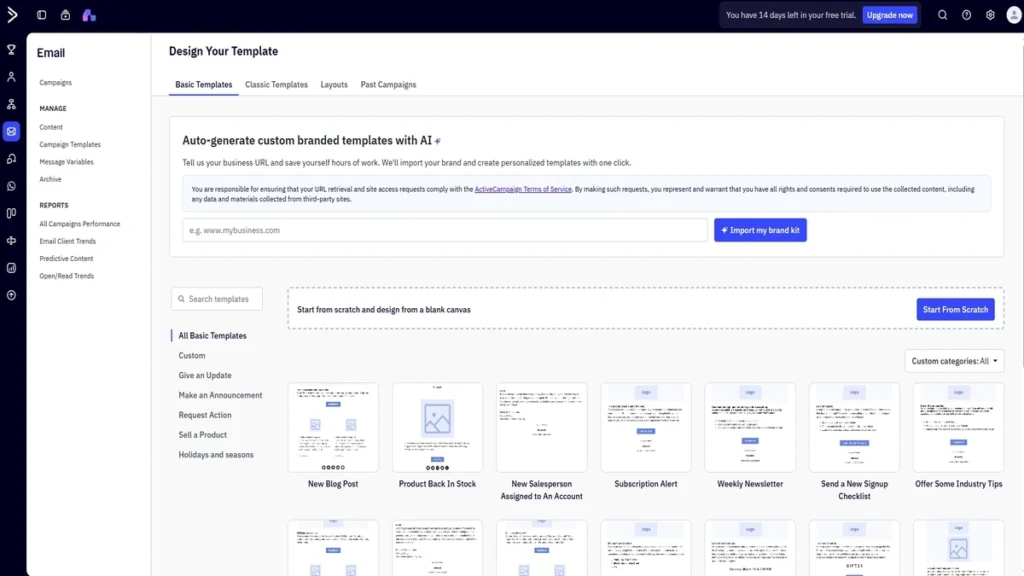
ActiveCampaign does not offer a permanent free email marketing plan. It does offer a 14-day free trial, with up to 100 email sends. Current trial documentation says the trial exposes features matching the Professional tier, although some capabilities are excluded during the trial.
That makes the trial more useful for testing automation than simply evaluating an email editor. You can build a workflow, test triggers, inspect reports and see how the platform fits your process before paying.
Marketing Prices and Plans in Detail (Month-to-Month Commitments)
This is an area where many online pricing articles become confusing.
ActiveCampaign’s public pricing page currently emphasizes annual-billed monthly equivalents, while ActiveCampaign also confirms that monthly billing is available. Annual plans are billed as a single yearly payment at a discounted rate, while monthly plans are billed each month.
At 1,000 contacts, current 2026 pricing references commonly show these starting monthly rates for month-to-month billing:
| Plan | Annual-billed monthly equivalent | Month-to-month reference price |
|---|---|---|
| Starter | $15/mo | $19/mo |
| Plus | $49/mo | $59/mo |
| Pro | $79/mo | $89/mo |
| Enterprise | $145/mo | $159/mo |
These monthly figures are useful for budgeting, but the important caveat is that ActiveCampaign public pricing interface is dynamic and does not expose every monthly/contact combination as a simple permanent table. Current pricing references also show that the annual discount is not a flat 20% on every tier.
For example, at the 1,000-contact level, $15 billed annually works out to $180 per year on Starter, compared with $19 × 12 = $228 on monthly billing. The difference is $48 over a year.
For Plus, $49 × 12 is $588, compared with $59 × 12 = $708 monthly. Pro is $948 annually equivalent versus $1,068 at $89/month, and Enterprise is $1,740 versus $1,908 at $159/month.
That means annual billing can save money, but the saving varies according to the plan.
The better question is not simply “monthly or annual?” It is how stable is my contact count and how certain am I that this is the right plan?
A business with a predictable list and established automation may prefer the lower effective annual cost. A new business still testing its stack may value the flexibility of monthly billing.
You can also combine annual commitments with other account-level choices, so the real cost should always be calculated using your actual contact band rather than the $15 headline price.
ActiveCampaign Starter Plan: Is it a Good Deal?
Starter is the easiest plan to misunderstand because its low entry price makes it look like a complete version of the platform.
At 1,000 contacts, the annual-billed price is $15. You get email marketing, multi-step automation, standard CRM and ecommerce integrations, limited segmentation, site and link tracking, and Active Intelligence capabilities with limits. The major restriction is five actions per automation.
That can be perfectly workable for simple sequences.
For example, imagine a five-step welcome flow:
- Contact joins a list.
- Send welcome email.
- Wait three days.
- Send educational email.
- Add a tag.
That is within the five-action ceiling depending on how your workflow is structured. The trouble starts when the automation needs many more actions, additional logic, more elaborate segmentation or several channels.
A SaaS company might want a journey that looks more like this:
Signup → welcome email → wait → check product activity → split audience → send different email → update score → notify sales → wait → send follow-up → move deal stage
A workflow like that quickly makes an automation action limit more relevant to the buying decision.
Plus removes the five-action ceiling and adds landing pages and standard segmentation. It also gives you access to additional capabilities such as broader AI features, ecommerce functionality and reporting.
So rather than asking whether Starter is “good,” think about the complexity of your automation. If your campaigns are mostly newsletters, welcome emails and short follow-ups, Starter may cover the workflow. If your business depends on longer lifecycle automations, the plan restriction becomes a much bigger part of the cost calculation.
CRM Pricing in Detail
ActiveCampaign’s base plans include contact management and a marketing CRM layer, but its enhanced CRM capabilities are sold separately through Pipelines and Sales Engagement add-ons.
The current ActiveCampaign pricing page describes two enhanced CRM packages:
Pipelines adds pipeline management, deal records, account records and lead scoring.
Sales Engagement includes the Pipelines functionality plus automated 1:1 email and additional AI capabilities such as win probability.
Current 2026 third-party pricing references report the following CRM add-on structure:
| CRM Add-on | Plus | Pro | Enterprise |
|---|---|---|---|
| Pipelines | $49/mo for 1 user | $77/mo for 1 user | $107/mo for 1 user |
| Additional Pipelines users | +$15/user | +$26/user | +$44/user |
| Sales Engagement | $85/mo for 1 user | $125/mo for 1 user | $179/mo for 1 user |
| Additional Sales Engagement users | +$39/user | +$53/user | +$71/user |
These figures are current reported 2026 add-on prices rather than figures displayed in ActiveCampaign’s general public feature grid, so the checkout price should be treated as the final source for an actual purchase.
This is where a seemingly inexpensive email platform can turn into a much larger marketing-and-sales subscription.
Suppose you have 1,000 contacts and pay $79/month for the annual-billed Pro plan. Adding Pipelines at the reported Pro rate of $77/month takes the software subtotal to $156/month before taxes or other add-ons.
If you need additional CRM users, the total rises again.
That does not make the CRM add-on a bad purchase. It simply means you should compare the total stack you actually need, not the email plan in isolation.
Example calculation for CRM plans
Here is a simple example.
Assume:
- 10,000 contacts
- Pro email plan
- Pipelines CRM
- One CRM user
The annual-billed Pro plan is currently listed at $375/month equivalent for 10,000 contacts. A reported Pipelines add-on price for Pro is $77/month for one user. That gives a base monthly software cost of approximately:
$375 + $77 = $452/month
Annualized, that is approximately $5,424 per year, before taxes and any additional usage or services.
Now add two more Pipelines users:
$375 + $77 + ($26 × 2) = $504/month
The example shows why seat planning matters. ActiveCampaign includes three users on Pro, but CRM add-on user pricing is separate from the normal plan allowance.
For larger sales teams, you should model the plan, contact tier, CRM package and number of sales users together before signing an annual contract.
ActiveCampaign Add-Ons: What Not Included in Your Plans
The base email plan is only one part of the ActiveCampaign product stack.
Depending on your setup, you may need:
- Enhanced CRM
- SMS
- Transactional email
- Custom reporting
- AI Activities
- WhatsApp Messaging
ActiveCampaign current help documentation confirms that add-ons can be purchased from the Billing & Upgrade area and that availability depends on your base plan.
The important budgeting rule is simple: do not compare an add-on-heavy ActiveCampaign account with the base price of another platform.
SMS
SMS requires the SMS add-on and is available with Plus, Professional and Enterprise plans. ActiveCampaign also charges for SMS usage through credits. Credits do not roll over to the next month.
For the United States, ActiveCampaign currently lists 1 credit per SMS message segment and 3 credits for a U.S. MMS. The amount can differ significantly in other countries. U.S. customers also need to complete A2P 10DLC registration before sending qualifying SMS traffic.
Current 2026 pricing references report SMS credit packages such as:
| SMS Credits | Reported Price |
|---|---|
| 1,000 | $16.83 |
| 2,500 | $36.83 |
| 5,000 | $52.83 |
| 10,000 | $88.83 |
| 25,000 | $176.83 |
| 50,000 | $336.83 |
These prices can change and may depend on the account or billing configuration, so they should be verified in the billing interface before purchase.
For a U.S. campaign, an easy budgeting example is 5,000 one-segment SMS messages per month. You would need roughly 5,000 credits before considering longer messages or MMS.
SMS can be valuable for appointment reminders, product alerts and short promotional sequences, but it should be treated as a separate messaging budget rather than assuming it is covered by your email subscription.
Transactional email
Marketing email and transactional email serve different purposes.
Marketing email includes newsletters, promotions, nurture sequences and other campaign messages. Transactional email covers messages such as order confirmations, password resets, account notifications and similar one-to-one events.
ActiveCampaign uses Postmark for its transactional email integration. ActiveCampaign’s documentation says an approved Postmark account is required.
Current Postmark pricing starts with:
| Postmark tier at 10,000 emails/month | Price |
|---|---|
| Free | $0 for 100 emails/month |
| Basic | $15/month |
| Pro | $16.50/month |
| Platform | $18/month |
Postmark current pricing page also charges for additional email volume above the included amount.
That means the real transactional-email cost is separate from the ActiveCampaign marketing subscription.
For a software company sending password resets, verification emails and purchase notifications, that distinction matters. A $15 ActiveCampaign plan does not mean those transactional messages are automatically included.
There is also a deliverability reason to keep marketing and transactional sending separated. Postmark specifically separates message streams and infrastructure for transactional versus broadcast mail.
For the internal content on this subject, a relevant supporting link is secure documents by email, particularly when discussing sensitive transactional communications.
Custom reports
ActiveCampaign’s standard plans already include campaign, contact, automation and other reporting capabilities. Custom Reporting is intended for teams that need more flexible reports across contacts, deals, campaigns, automations and ecommerce data.
The current pricing structure includes Custom Reporting with Enterprise and makes it available as an add-on on eligible lower plans. Current 2026 pricing references report the add-on at $159/month, with 50 reports and 25 dashboards reported for that package.
At $159/month, this is not a casual add-on.
A company should pay for it because it actually needs custom reporting, not simply because more dashboards sound useful. Before buying it, check whether the native campaign, automation, revenue and ecommerce reports already answer the questions your team asks.
For example, if you only need to know:
- revenue from a campaign,
- click rate,
- automation performance,
- list growth,
- or campaign trends,
the included reports may be enough.
Custom Reporting becomes more relevant when you need custom views combining several objects or business processes.
Dedicated IP
The current dedicated-IP policy is another area where older pricing articles can mislead readers.
ActiveCampaign says most customers use its shared IP pools and that a dedicated IP does not automatically improve deliverability. In fact, ActiveCampaign says most smaller senders are better served by shared infrastructure because shared IPs are already warmed and managed for volume.
The current dedicated-IP cost is $750 per IP address.
ActiveCampaign currently requires at least 100,000 active, opted-in, engaged contacts that you regularly email to acquire a dedicated IP. Unlike some older pricing articles that associated the feature primarily with Enterprise, the current help documentation says a dedicated IP can be available on any plan level, subject to the requirement.
This is an important distinction.
A dedicated IP should not be bought simply because your business is growing. It becomes more relevant when your sending volume and reputation-management process justify controlling the sending IP yourself.
You also have to keep a dedicated IP warm. ActiveCampaign explains that inconsistent volume can damage its reputation and that a cold IP requires warm-up work.
Are There Any Hidden Costs Associated with ActiveCampaign?
“Hidden” is not quite the right word because ActiveCampaign documents many of these charges. The problem is that they are easy to overlook when you only look at the headline plan price.
The first issue is contact counting.
For accounts created on or after November 3, 2025, all contacts count toward the contact limit, regardless of whether they are active, unsubscribed, bounced or unconfirmed.
That means a business with 8,500 people it regularly emails plus another 1,500 old or non-marketable records has a 10,000-contact database for billing purposes under the newer rule.
The second issue is the contact-limit cutoff.
If you reach your limit and do not enable automatic upgrades, ActiveCampaign does not automatically increase that limit. The platform says that once the limit is reached, you cannot send email campaigns, while contacts moving through an automation can skip “Send an email” actions.
ActiveCampaign recommends enabling auto-upgrade to prevent workflow interruptions. Starter accounts also have a maximum of 25,000 contacts.
The third issue is email overages.
ActiveCampaign’s September 2026 documentation says that once you reach your monthly sending limit, the platform can continue sending and charge an overage of $0.005 per email. If the overage reaches three times the monthly limit, email sending is turned off until the next month.
For example, if your plan allows 100,000 marketing sends and you go 20,000 over, the simple overage calculation is:
20,000 × $0.005 = $100
That is why monthly send volume should be part of your pricing calculation.
The fourth issue is user seats.
Starter and Plus currently include one user, Pro includes three, and Enterprise includes five. Additional user charges can apply to certain services and add-ons.
The fifth issue is feature gating.
You may discover after implementation that you need landing pages, enhanced CRM, predictive sending, advanced segmentation, custom reporting or premium ecommerce integrations. At that point, the cheapest plan is no longer the plan you actually need.
A useful way to avoid that problem is to build a one-page requirements list before buying. If a feature is essential, put it in the calculation from day one.
This is also where marketing software RFP tips can help if your team is formally comparing marketing platforms. Your RFP should ask for the price at your contact count, expected monthly send volume, user count and all required add-ons.
Another current pricing consideration is AI usage. ActiveCampaign provides AI Activities as a separate usage-based add-on for certain AI actions and translations. The available quantity can be increased, and unused activities do not roll over. (ActiveCampaign Help Center)
So the true cost of ActiveCampaign is better represented by:
Base plan + contact tier + email capacity + users + required add-ons + usage-based extras
That is the number to compare against other platforms.
How Does ActiveCampaign Pricing Compare to Other ESPs?
The right comparison depends heavily on how you use your email platform.
An ESP that looks cheaper at 1,000 contacts can become more expensive once you add landing pages, CRM, ecommerce tools or higher automation tiers. Likewise, an apparently more expensive platform can be reasonable for a team that would otherwise pay for several separate tools.
For 2026, ActiveCampaign’s entry price is $15/month for 1,000 contacts on annual billing, but its sending allowance is tied to contact count. GetResponse, Mailchimp and Klaviyo use different combinations of contact/profile limits, sending allowances and feature tiers, so the monthly price alone does not tell the whole story.
A practical comparison should examine at least:
| Factor | Why it matters |
|---|---|
| Contact pricing | Determines how the bill grows with your list |
| Email send limits | Important for frequent newsletters |
| Automation depth | Affects lead nurturing and lifecycle campaigns |
| Segmentation | Determines how precisely you can target subscribers |
| Landing pages | May replace a separate tool |
| CRM | Matters for sales and lead management |
| Ecommerce | Important for stores |
| SMS | Adds channel and usage costs |
| Transactional email | May require a separate service |
| Team seats | Can materially affect larger accounts |
| Reporting | Important for attribution and revenue analysis |
For a broader platform review, you can also point readers toward best email marketing platforms in 2026.
ActiveCampaign vs GetResponse
GetResponse currently lists its Starter plan at $19/month or $15.58/month when paid annually and includes unlimited monthly email sends, a landing page builder and one custom automation workflow. Its Marketer plan is listed at $59/month or $48.38/month annually in the current U.S. pricing information.
ActiveCampaign Starter starts at $15/month annually for 1,000 contacts, but its marketing send allowance is 10 times the contact limit, so a 1,000-contact account has a 10,000-email monthly allowance.
That creates an important difference in how the products should be evaluated.
GetResponse pricing model can be attractive for marketers who send frequently because the Starter page advertises unlimited monthly email sends. ActiveCampaign, meanwhile, places more emphasis on contact-based plans and a broader automation ecosystem.
If you run five or ten newsletters every month, sending volume needs to be part of the comparison. If your email volume is low but your automations are complex, automation depth and feature availability may matter more.
ActiveCampaign vs Mailchimp
Mailchimp continues to offer a free entry point under its current plan structure, while ActiveCampaign uses a 14-day free trial rather than a permanent free plan. Mailchimp’s current official pricing page shows a free tier with limited contacts and sends, while ActiveCampaign’s trial allows up to 100 email sends for 14 days.
ActiveCampaign’s own August 2026 comparison page lists Mailchimp Essentials at $26.50/month for 1,000 contacts, compared with $15/month for ActiveCampaign Starter at the same contact level. It also lists Mailchimp Standard at $45 and Premium at $350 for 1,000 contacts.
But price is only one part of the difference.
ActiveCampaign current Starter plan includes multi-step automation, a CRM layer, standard ecommerce integrations and 10× contact-based sending. Mailchimp’s lower plans are more constrained in workflow depth, according to the same current comparison.
For a simple broadcast newsletter, the extra automation capabilities may not matter much. For lifecycle marketing, onboarding sequences, lead scoring and more involved customer journeys, automation features become a much bigger part of the buying decision.
Mailchimp is also not the only platform to consider inactive-contact billing. The key is to compare the current contact definition and pricing model of each provider rather than relying on older reviews.
ActiveCampaign vs Klaviyo
Klaviyo is heavily focused on ecommerce and customer data, while ActiveCampaign’s current positioning spans lifecycle marketing, CRM, automation, ecommerce, AI and multiple channels.
Current 2026 ActiveCampaign comparison information lists Klaviyo paid email offering at about $30/month for 1,000 active profiles, while Klaviyo also offers a free plan capped at 250 active profiles and 500 email sends per month. Klaviyo own current pricing page confirms those free-tier limits.
The distinction between a contact and an active profile is important.
ActiveCampaign’s newer accounts count all contacts toward the contact limit. Klaviyo’s free tier is explicitly built around active profiles. So two businesses with the same raw database size can end up with different billable counts depending on how each platform defines the people it charges for.
Klaviyo also uses a more ecommerce-centric ecosystem, while ActiveCampaign includes built-in CRM functions and landing pages in its higher base plans. ActiveCampaign lists more than 1,000 integrations on its current site, compared with Klaviyo’s 350+ pre-built integrations.
For an ecommerce business, the comparison should therefore include more than the email subscription. Look at product data, abandoned-cart automation, revenue attribution, SMS, CRM needs, landing pages and the rest of the stack.
ActiveCampaign Pricing: Conclusion
ActiveCampaign’s 2026 pricing is no longer well represented by the older $19/$59/$89/$159 figures that still appear in many articles as the main headline.
The current U.S. pricing page starts at $15/month for Starter, $49 for Plus, $79 for Pro and $145 for Enterprise at the entry contact level when billed annually. Prices then rise as the contact count increases.
The more useful way to understand the platform is to think in layers.
First, choose the required feature tier.
Then calculate the contact band.
Then check your expected monthly email volume against the 10×, 10×, 12× and 15× sending limits.
After that, add any CRM, SMS, transactional email, custom reporting or AI usage that your workflow requires.
For a small list and simple campaigns, the Starter entry price can be enough. A company that needs landing pages and unlimited automation actions has a different cost profile. A sales-led organization using enhanced CRM needs another calculation again.
The biggest 2026 pricing change to understand is the contact-count rule for new accounts. Since all contacts count for newer accounts, unsubscribed, bounced and unconfirmed records can influence the bill.
That makes list hygiene a financial issue as well as an email-marketing issue.
It also makes switching decisions more important. If you’re considering moving platforms, map your contacts, automations, forms, integrations and reporting before signing a new contract. A useful starting resource is switch email service provider.
Finally, don’t judge the value of email software from the subscription price alone. The real question is whether the platform gives you the automation, segmentation, reporting, integrations and sending capacity your business actually uses.
A $15 plan that forces you into multiple extra tools may not remain a $15 solution. A higher plan that replaces several separate subscriptions can produce a very different total cost.
For businesses comparing the economics of the full email stack, the most useful number is therefore not the advertised starting price. It is your 12-month total cost at your actual contact count, sending volume, user count and required features.
And the most useful marketing metric is not just how much the software costs. It is what your campaigns produce relative to that cost.
That is where why email marketing still wins fits into the bigger picture: platform pricing should be assessed against the role email plays in acquisition, retention, lifecycle communication and revenue.
FAQ
What counts as a subscriber?
ActiveCampaign generally refers to an individual contact record, which can be associated with a unique email address, phone number or both. For newer accounts created on or after November 3, 2025, all contacts count toward the contact limit regardless of whether they are active, unsubscribed, bounced or unconfirmed.
What happens if I exceed my subscriber limit?
ActiveCampaign does not automatically increase the contact limit unless you enable its auto-upgrade feature. Without an increase, you cannot send email campaigns, and contacts moving through automations can skip email-send actions. ActiveCampaign recommends enabling auto-upgrade to reduce the risk of interrupted workflows.
Can I clean up my subscribers?
Yes. ActiveCampaign allows you to manage contacts by status and remove or archive records you no longer need. List cleanup can reduce unnecessary database growth and also helps maintain a healthier marketing database.
How many emails are included?
For plans purchased under the current structure, Starter and Plus allow 10× the contact limit, Pro allows 12×, and Enterprise allows 15×. A 5,000-contact Pro account, for example, has a 60,000-email monthly marketing send limit.
Are there any discounts for NGOs?
Yes. ActiveCampaign currently offers a 20% nonprofit discount for eligible nonprofit organizations after the required nonprofit status is verified. New and existing accounts use different contact processes for requesting the discount.


