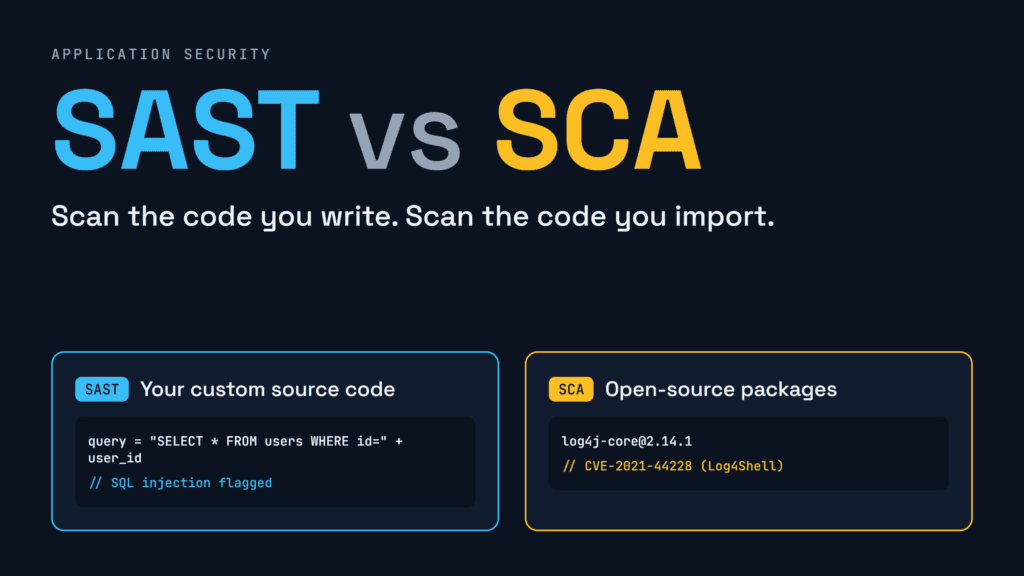
Quick Answer: SAST vs SCA comes down to whose code you check. SAST scans the custom source code your developers write from scratch, while SCA scans the open-source libraries and third-party packages your team imports to build software faster.
Building an app is like running a busy kitchen. Your chef writes a secret house sauce recipe from scratch, while buying pre-made pasta and spices from outside suppliers to save time.
If a customer gets sick, the flaw could come from two places: a mistake in the chef’s house recipe, or a spoiled store-bought ingredient. Teams delivering modern SaaS development services face this exact split in every release. Understanding SAST vs SCA helps you inspect both homemade code and borrowed packages before attackers strike.
What Is SAST and How Does It Check Your Code?
Quick Answer: SAST (Static Application Security Testing) scans the proprietary source code your developers write from scratch to find flaws like SQL injection and cross-site scripting before the program ever runs.
Think of SAST as a security spell-checker for your team’s own code. When developers write login pages, checkout forms, or payment rules, they can leave security holes behind. SAST reads source code, bytecode, or binaries line by line without running the program.
According to testing guidelines from OWASP, static analyzers build an abstract syntax tree (AST) to trace how untrusted input travels from a user form (“source”) to a database call (“sink”). Popular SAST tools like Semgrep, SonarQube, and GitHub CodeQL catch four main issues in custom code:
- Injection flaws: SQL, OS command, and template injections where untrusted input tricks the backend.
- Cross-Site Scripting (XSS): Unvalidated inputs that run harmful scripts inside a visitor’s browser.
- Weak cryptography: Custom functions that misuse symmetric vs asymmetric encryption, hardcoded API keys, or broken hashing like MD5.
- Logic and memory bugs: Buffer overflows, race conditions, and missing authorization checks.
Teams often compare SAST vs DAST to balance early code reviews against live server testing. Still, SAST ignores third-party packages. In the SAST vs SCA comparison, SAST only guards the 10% to 20% of an app that your engineers typed themselves.
What Is SCA and Why Does Open Source Vulnerability Scanning Matter?
Quick Answer: SCA (Software Composition Analysis) performs open source vulnerability scanning on third-party packages, frameworks, and lockfiles to uncover known CVEs, outdated libraries, and risky software licenses in your supply chain.
Open-source libraries make up 70% to 90% of most commercial apps. When an engineer runs npm install or pip install, they pull in direct packages plus hundreds of hidden “transitive” dependencies that those packages rely on.
This is where open source vulnerability scanning is essential. Instead of reading custom logic, an SCA tool (like Trivy, OWASP Dependency-Check, or Snyk Open Source) inspects package manifests (package.json, pom.xml, requirements.txt), lockfiles, and container layers. It maps every borrowed component and checks exact version numbers against the National Vulnerability Database (NVD) and GitHub Advisory Database.
When a critical bug like Log4Shell (CVE-2021-44228) emerges, SAST cannot find it because your team did not write Log4j. SCA spots the vulnerable version in seconds. When teams examine what risk is posed by Internet of Things devices, outdated open-source firmware libraries almost always top the list. Maintaining strong IoT security and cloud safety requires SCA to do four jobs:
- Find known CVEs: Match direct and transitive package versions against public exploit databases.
- Block malicious packages: Detect typosquatted or poisoned packages uploaded to public registries.
- Generate an SBOM: Output a Software Bill of Materials (in CycloneDX or SPDX format) listing every library in your build.
- Check license compliance: Warn teams if a developer imports a restrictive copy-left license (like AGPL or GPL) into proprietary software.
Software Composition Analysis vs SAST: Side-by-Side Comparison
Quick Answer: Comparing software composition analysis vs SAST comes down to code ownership: SAST inspects the custom code your team writes, whereas SCA checks the open-source dependencies yourteam imports.
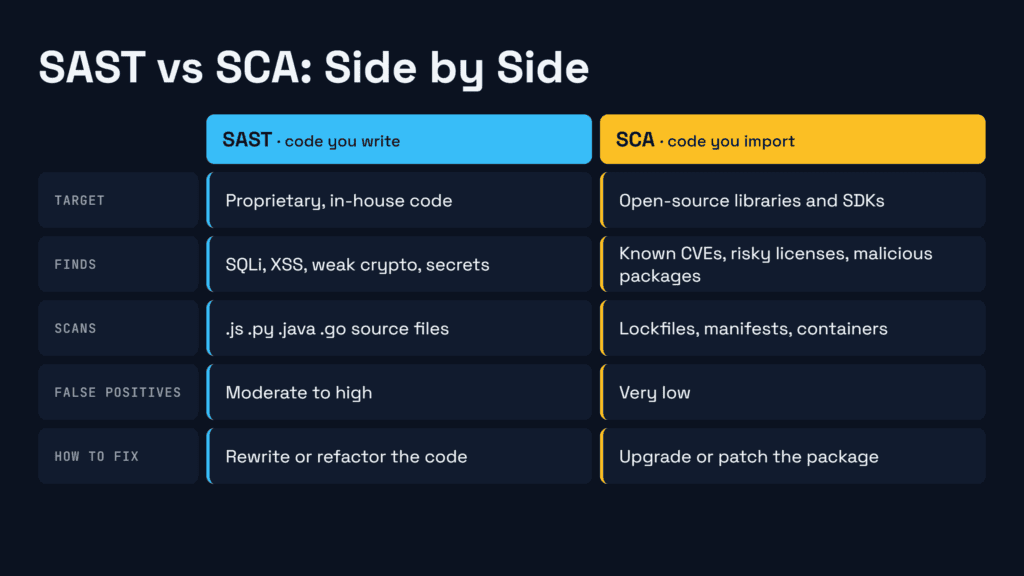
Evaluating software composition analysis vs SAST shows how each tool covers a distinct half of your codebase and maps to NIST SSDF (SP 800-218) compliance controls:
| Factor | SAST (Static Application Security Testing) | SCA (Software Composition Analysis) |
| Target Code | Proprietary code written by in-house developers | Open-source libraries, third-party SDKs, packages |
| Files Scanned | .js, .py, .java, .go, .cs source files | package-lock.json, pom.xml, go.mod, containers |
| Detects | Coding mistakes (SQLi, XSS, broken auth, secrets) | Known CVEs, malicious packages, license risks |
| False Positives | Moderate to high (needs rule tuning) | Very low (matches exact versions to known CVEs) |
| Scan Speed | Slower on large repos (deep data-flow checks) | Fast (parses manifest and lockfiles in seconds) |
| NIST & SBOM | No SBOM (Covers NIST PW.7 human-written code) | Generates SBOM (Covers NIST PW.4 third-party code) |
| Leading Tools | Semgrep, SonarQube, CodeQL, Checkmarx | Trivy, Snyk Open Source, Dependabot, Sonatype |
| How to Fix | Rewrite or refactor custom source code | Upgrade package version or patch dependency |
Treating SAST vs SCA as an either/or choice leaves half your app exposed. Running only SAST misses vulnerable npm packages; running only SCA misses SQL injection flaws in custom login code.
Why Do AI Coding Assistants Make SAST vs SCA Even More Critical?
Quick Answer: AI coding tools generate custom code and suggest external packages in seconds, requiring both SAST to catch AI-written logic bugs and SCA to block hallucinated or outdated libraries.
Developers now use AI coding assistants to write functions and import libraries in seconds. However, AI models trained on older public repositories often reproduce insecure coding patterns like unparameterized SQL queries which only SAST can catch.
Meanwhile, AI tools can suggest outdated library versions or hallucinate package names that attackers register as malicious “slopsquatting” packages. Running both scanners in your SAST vs SCA pipeline stops AI-generated flaws before they merge.
How Do You Combine SAST and SCA Tools in DevSecOps?
Quick Answer: Pairing SAST and SCA tools in DevSecOps works best when you scan custom code inside the developer IDE and audit open-source dependencies automatically during every pull request build.
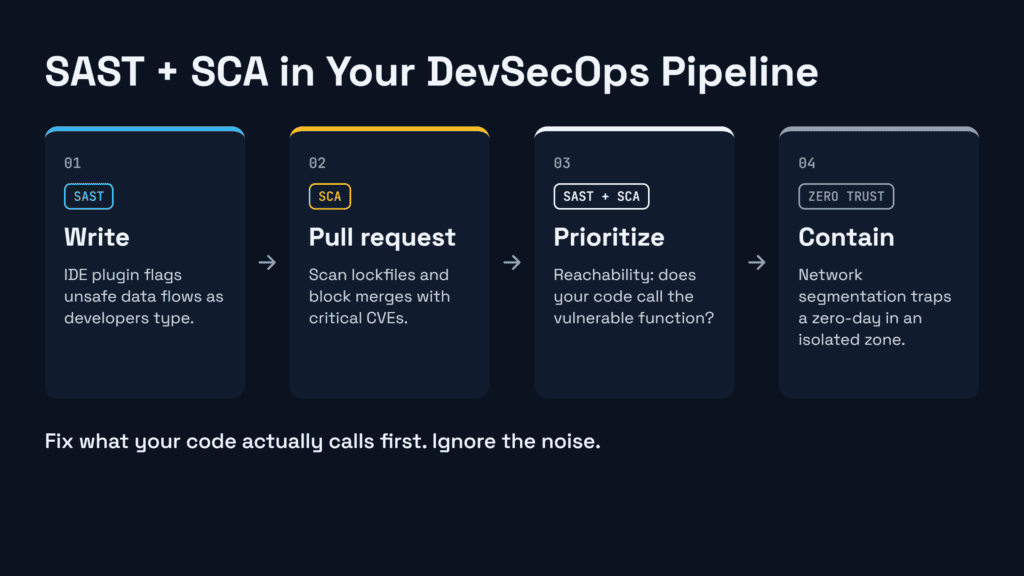
High-performing teams embed SAST vs SCA checks into automated workflows so engineers get feedback in minutes. Using both SAST and SCA tools in DevSecOps pipelines follows four steps:
1. Catch Custom Bugs in the IDE with SAST
Give developers lightweight SAST plugins in VS Code or IntelliJ. As an engineer writes a route, the scanner highlights unsafe data flows on the spot.
2. Run SCA Tools in DevSecOps Build Pipelines
Trigger open source vulnerability scanning whenever a developer opens a pull request or edits a lockfile. Modern SCA tools in DevSecOps check whether newly added libraries contain critical CVEs, blocking risky merges before production.
3. Cut Alert Noise by 80% with Reachability Analysis
Not every vulnerable library is exploitable. Combining software composition analysis vs SAST data lets platforms trace “reachability.” If SCA finds a CVE in a library, SAST checks whether your custom code actually calls that broken function. If not, you can safely deprioritize the alert.
4. Enforce Zero Trust and Network Controls
Pair build checks with a strict Zero Trust network architecture so microservices verify every request. Adding proper network segmentation ensures that even if a zero-day dependency bug slips through, the attacker stays trapped in an isolated zone.
What Mistakes Do Teams Make With SAST vs SCA?
Quick Answer: Teams often fail at SAST vs SCA by assuming one scanner covers both code types, ignoring hidden transitive dependencies, or overwhelming developers with hundreds of unprioritized security alerts.
Avoid these three traps when rolling out SAST vs SCA across your team:
- Scanning manifests without lockfiles: Scanning
package.jsonalone misses deep transitive dependencies. Always scan resolved lockfiles (package-lock.jsonoryarn.lock). - Drowning developers in false positives: Turning on every default SAST rule on day one creates alert fatigue. Block only high-confidence, reachable flaws on pull requests.
- Stopping at build time: Static scanners cannot see live runtime attacks. Back up your SAST vs SCA checks with live endpoint monitoring see our guide on EDR vs XDR to protect active workloads.
Frequently Asked Questions About SAST vs SCA
Quick Answer: These common questions explain how SAST vs SCA work together, why false positive rates differ, and which scanner your engineering team should deploy first in a modern pipeline.
What is the main difference between SAST and SCA?
The main difference in SAST vs SCA is code ownership. SAST analyzes proprietary source code your developers write to find coding errors. SCA inspects open-source libraries and third-party packages your app imports to find known CVEs and license risks.
Does SAST detect open-source vulnerabilities?
No. SAST tools do not check package registries or compare library versions against CVE databases. To catch third-party flaws like Log4Shell, you need open source vulnerability scanning through an SCA tool.
Why does SCA have fewer false positives than SAST?
SCA matches exact package names and versions against verified CVE databases. SAST estimates how data flows through custom code without running the app, which can flag safe code paths unless tuned.
How do SAST, SCA, and DAST work together?
SAST checks custom code and SCA checks open-source dependencies while code is at rest. DAST tests the running app from the outside to catch runtime server and authentication flaws.
Which tool should beginners start with?
Start with SCA first. Connecting an SCA scanner to your repository takes minutes, produces very few false alarms, and protects the 80% of your codebase made up of open-source packages.
Which Scanner Should You Deploy First: SAST, SCA, or Both?
Quick Answer: Start with SCA for quick wins and low false positives on open-source packages, then layer in SAST to protect custom business logic across your entire application lifecycle.
Follow this three-step rollout this week:
- Turn on SCA on every repository: Scan lockfiles today, generate an SBOM, and automate pull requests for critical dependency upgrades.
- Add focused SAST checks on pull requests: Scan newly written code for high-severity injection and authentication bugs before merges happen.
- Prioritize with reachability: Fix open-source bugs that your custom code calls in production first.
Combining smart SAST vs SCA automation in your daily workflow lets your team ship fast, pass audits, and keep both custom logic and open-source dependencies secure.